On-Page SEO Checklist for Edmonton Small Businesses
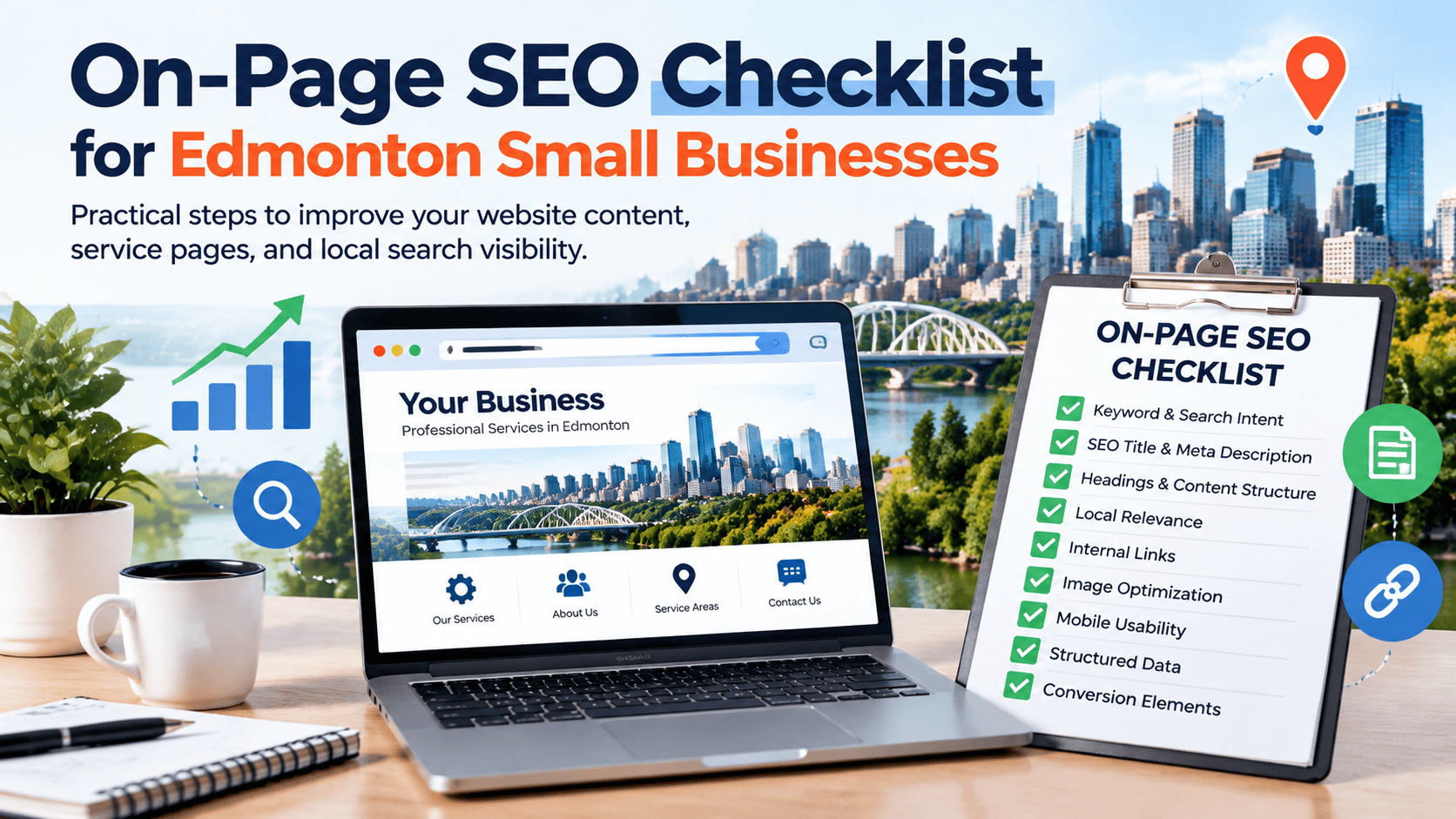
Your website should help potential customers understand what you offer, decide whether your business is right for them, and take the next step. An on-page SEO checklist helps you review the page elements that support those goals, including search intent, titles, headings, content, internal links, images, local information, and usability.
On-page SEO is more than adding a city name or repeating a keyword. Each important page should answer a real customer need, describe the service accurately, and make it easy for visitors to find useful information or contact you. For Edmonton small businesses, that means clearly explaining which services you provide, who they help, and which locations you genuinely serve.
Use this checklist one section at a time. Start with pages that matter most to your business, such as your main service pages, contact page, and pages that already receive search impressions. You do not need to change every page at once, and completing the checklist cannot guarantee a ranking or conversion result. It gives you a structured way to find issues and prioritize useful improvements.
What Is On-Page SEO?
On-page SEO is the process of improving the content and page-level elements of a website so visitors and search engines can understand what each page offers. It includes the words on the page, title tag, headings, internal links, image descriptions, and other elements that help communicate the page’s purpose.
- On-page SEO: Improves page content, titles, headings, internal links, images, and other page-level information.
- Technical SEO: Addresses issues such as crawling, indexing, canonicalization, redirects, site architecture, and performance.
- Off-page SEO: Covers activities outside the website, such as earning relevant backlinks and building legitimate online references.
These areas overlap and support one another. A useful service page may still struggle if search engines cannot index it, while a technically accessible page may not meet a customer’s needs if the content is vague. On-page SEO supports a broader local SEO strategy, but it does not guarantee rankings, Google Maps visibility, traffic, or enquiries.
The Complete On-Page SEO Checklist
Review each important page according to its purpose, audience, and current performance. Some improvements take minutes; others may need content planning or development support. Record what you find so you can decide what to address first.
1. Match Each Page to a Clear Search Intent
Search intent is the reason someone makes a search. Before editing a page, ask what the visitor is trying to learn or accomplish.
- Informational: The person wants to understand a topic or solve a problem.
- Commercial investigation: The person is comparing providers, services, or options.
- Transactional: The person is ready to contact a business, book, or purchase.
- Navigational: The person is looking for a particular business or website.
Match the page format to the need. For example, a blog post explaining how to choose a plumber should educate readers, while a plumbing service page should explain the service, service area, process, and how to request help. Keep each page focused rather than combining unrelated services and questions into one confusing page.
2. Choose a Primary Keyword and Relevant Variations
Choose a primary keyword that accurately describes the page and matches what a potential customer is likely to search. Then identify natural variations, related concepts, and common questions. A service page might use the main service phrase alongside terms that describe its process, use cases, or relevant service area.
Use language that sounds natural. Repeating the exact phrase in every paragraph does not make the page more helpful. Also review existing content before creating a new page. Keyword cannibalization happens when multiple pages unnecessarily target the same search intent and compete to serve essentially the same purpose. Where pages overlap, consider whether they need clearer roles, stronger differentiation, or consolidation.
3. Write a Clear, Descriptive SEO Title
The title tag helps describe the page in search results, browser tabs, and other contexts. Write a distinct title for each important page. Include the primary phrase naturally when it helps users understand the topic, and avoid misleading promises or repeated strings of keywords.
There is no strict character count that guarantees a title will display exactly as written. Google may generate a different title link using the title element, visible headings, and other page signals. Aim for a concise, accurate description rather than writing to a rigid length formula.
Illustrative example:
- Before: Home | ABC Services
- After: Residential Plumbing Services in Edmonton | ABC Services
This is an example of clearer wording, not evidence of a ranking improvement. Use a location in the title only when it accurately reflects the business and page.
4. Create a Helpful Meta Description
A meta description summarizes the page and may help a searcher decide whether to visit. Make it specific, accurate, and useful. Explain what the page covers and, when appropriate, invite the reader to review services or take the next step.
Avoid stuffing keywords, copying the same description across every page, or making claims the business cannot support. Google may generate a different snippet based on the search query and page content, so the meta description is not a guaranteed ranking lever.
Illustrative example: “Explore residential plumbing services in Edmonton, learn what to expect, and find the right way to request service from our team.”
5. Structure Content With Useful Headings
Headings make a page easier to scan and help communicate its structure. Use one clear main heading (H1) that identifies the page topic, H2 headings for major sections, and H3 headings for relevant subsections. Most importantly, make the heading hierarchy logical and ensure each heading accurately describes the content below it.
Do not force a keyword into every heading or use headings only to change text size. If a section answers a customer question, use a heading that makes that answer easy to find. Visual styling should be handled separately from the document’s heading structure.
6. Write Useful, Original, Customer-Focused Content
Answer the visitor’s main question early, then provide enough detail to help them make a decision. Depending on the page, useful information may include what the service covers, who it is for, how the process works, what affects cost, what limitations apply, what customers should prepare, and what happens next.
Include original examples, accurate service details, real expertise, and evidence where available. Remove repetitive paragraphs, generic claims, and filler written only to make the page longer. There is no universal word count that guarantees better rankings. The appropriate length is the length needed to answer the user’s question clearly and completely.
Use people-first content as your standard: would the page still be useful if someone found it without coming from a search engine? If not, revisit the purpose and the information provided.
7. Add Genuine Local Relevance
If your business serves Edmonton and surrounding areas, explain that accurately where it helps customers decide whether you are a suitable provider. Mention relevant service areas, genuine local projects, local customer needs, and practical service details when those facts are available.
A city name alone does not make a page locally relevant. Avoid creating many near-identical location pages by changing only “Edmonton” to another place name. Each location page should offer a genuine reason to exist and useful information for people in that area. Keep website details consistent with relevant business listings, and never invent an office, project, testimonial, credential, or service area.
8. Optimize Internal Links
Internal links connect pages on your own website. They help visitors discover related information and give search engines paths to other pages. Link from helpful articles to relevant service pages, connect related guides when it benefits readers, and make important pages accessible through logical navigation.
- Use descriptive anchor text that explains what the destination offers.
- Link only where the source and destination have a meaningful relationship.
- Check for broken links, redirect chains, and links pointing to the wrong page.
- Make sure important pages are not isolated from the rest of the site.
There is no universal number of internal links each page needs. Focus on clarity and usefulness instead of repeating exact-match commercial anchors or adding links just to reach a target count.
9. Optimize Images and Media
Relevant images can explain a service, show a real project, or make complex information easier to understand. Use clear, appropriately sized images and compress files when needed to avoid unnecessary page weight. Choose descriptive file names where practical and place images near the content they illustrate.
Write alt text for meaningful images so people using assistive technology can understand their purpose or content. For a decorative image that adds no information, an empty alt attribute may be appropriate. Avoid stuffing keywords into alt text or describing every visual detail when it is not relevant. Balance image quality, accessibility, and performance.
10. Improve Readability and Conversion Elements
A page should work for people, not just search engines. Use short paragraphs, plain language, useful lists, and a layout that makes important information easy to find. Make contact details and calls to action visible without forcing visitors to search through the page.
Check that forms are understandable and work on mobile devices. Use genuine testimonials, verifiable credentials, and relevant trust signals where available. Remove pop-ups or visual elements that block the task a visitor came to complete. Clear information can help people feel confident about the next step, but no single design change guarantees more conversions.
11. Add Relevant Structured Data Where Appropriate
Structured data is a standardized way to label information on a page so search engines can interpret supported details. Depending on the page and business, relevant types may include Organization, LocalBusiness, Product, Article, or other types that accurately describe visible content and meet current documentation requirements.
Use only markup that fits the page, ensure it matches information visitors can see, and validate it with Google’s Rich Results Test or the Schema Markup Validator as appropriate. Structured data can make a page eligible for certain enhanced search appearances, but valid markup does not guarantee a rich result or higher ranking. Complex implementations should be reviewed by a technical SEO specialist.
12. Review Page Experience and Mobile Usability
Test important pages on mobile and desktop. Make sure text is readable, menus and buttons work, forms are easy to complete, and the layout does not shift unexpectedly or hide important information. Check loading performance and Core Web Vitals, which measure aspects of loading, interactivity, and visual stability.
Use performance tools to find specific issues rather than treating a single score as a complete measure of quality. Some problems require development work, technical SEO support, or changes to third-party scripts. Also review accessibility barriers that prevent visitors from navigating or completing important tasks.
13. Check URLs and Page Consistency
Use readable URLs that give visitors a reasonable idea of what a page covers. Keep established URLs stable unless there is a clear reason to change them. An unnecessary URL change can disrupt links and require redirects.
For important pages, check that each page has a clear purpose, internal links point to the intended destination, redirects work as expected, and canonical signals are appropriate. Confirm that pages intended to appear in search are eligible for indexing. Canonicalization, indexing, crawling, and redirect issues can involve technical SEO; escalate complex problems instead of making disruptive changes without understanding the consequences.
14. Add Helpful FAQs When They Serve the Reader
FAQs can answer genuine questions that remain after the main content. Use concise, accurate answers based on real customer concerns, such as what a service includes, what information a customer should prepare, or how the process works.
Do not add repetitive questions just to insert more keywords. If a question is central to the visitor’s decision, answer it in the main content as well. FAQ content or FAQ structured data does not guarantee an enhanced search result.
15. Measure Results and Refresh Content
Record a baseline before making significant changes. Google Search Console can show search queries, impressions, clicks, click-through rate, and average position for your site and pages. Analytics data, when correctly configured, can help you understand what visitors do after arriving.
Look for pages with meaningful impressions but relatively few clicks, queries that do not match the page’s purpose, and landing pages that receive organic visits but do not lead to useful actions. Interpret data in context: results can vary by query, position, device, and search appearance.
Update outdated information, strengthen sections that do not answer user questions, and record what changed and when. Avoid repeatedly rewriting pages without a reason. Performance changes can have several causes, and an on-page edit does not guarantee a particular outcome.
How to Apply This Checklist to a Local Service Page
Consider a hypothetical Edmonton plumbing company reviewing its residential plumbing service page. The goal is to make the page clearer and more useful, not to assume that a checklist alone will improve rankings.
- Audience and intent: Determine whether visitors want to compare providers, understand a service, or request help. Make sure the page serves that need.
- Keyword focus: Choose a clear service topic and related language customers naturally use. Check whether another page already serves the same purpose.
- Title and H1: Write a distinct title and a clear H1 that accurately describe the service and location where relevant.
- Introduction and headings: Explain the service early, then use descriptive sections to cover the process, common questions, and next steps.
- Service information: Clarify what is included, any limitations, what may affect pricing, and how customers can prepare.
- Local relevance: State the actual service area. Do not list places the company does not serve or imply it has a physical office where it does not.
- Proof and trust: Add genuine reviews, real project details, qualifications, or other verifiable information if available.
- Internal links: Connect the page to relevant plumbing guides, related services, and the contact page.
- Call to action: Make the next step clear, whether that is calling, submitting a form, or requesting information.
- Mobile and tracking: Test the page on a phone, submit a controlled test form, and confirm that meaningful conversions are measured correctly.
Record each issue, the evidence behind it, the proposed change, and the metric you will review later. Fix broken contact paths or inaccurate information promptly. For content and search appearance changes, compare performance over a suitable period and consider other changes that may affect the results.
Common On-Page SEO Mistakes to Avoid
- Repeating keywords unnaturally: Write for the reader and use related terms only when they fit.
- Reusing the same SEO title: Give important pages distinct titles that describe their specific purpose.
- Publishing near-duplicate location pages: Create location content only when it offers real, accurate value for that audience.
- Ignoring search intent: Match the page format and information to what visitors need.
- Neglecting internal links: Connect related pages where it helps readers find the next useful resource.
- Using misleading titles or descriptions: Make search snippets accurate and consistent with the page.
- Adding irrelevant structured data: Mark up only information that genuinely applies and meets current guidelines.
- Changing too many elements at once: Record changes so you can interpret performance more carefully.
- Overlooking mobile forms: Test the entire contact process, not just whether the page looks attractive.
- Making technical changes without a plan: Review canonical tags, redirects, and indexing settings carefully and get specialist help when needed.
Which On-Page SEO Issues Should You Fix First?
Prioritize work based on business importance, user impact, evidence, and implementation effort. The right order depends on the website, but this framework can help a small business decide where to begin.
- Protect important user journeys. Fix broken forms, incorrect contact details, and calls to action that do not work.
- Improve important page relevance. Clarify service descriptions, address mismatched intent, and add essential missing information.
- Correct titles and headings. Make important pages distinct and accurately described.
- Strengthen internal linking. Help people and search engines discover key pages.
- Improve readability and mobile usability. Remove friction that makes pages difficult to use.
- Address technical blockers. Escalate crawling, indexing, canonicalization, and redirect problems that affect important pages.
- Monitor and refine. Use search and conversion data to decide what to improve next.
This is a practical framework, not a universal sequence. If a technical issue prevents an important page from being indexed, it may need attention before content refinements. Start with pages that matter most to customer needs, leads, and revenue.
When Should You Hire an On-Page SEO Specialist?
Professional support may be useful when your website has many service pages, multiple pages competing for similar searches, important pages with unclear content, strong impressions but relatively few clicks, weak organic conversion performance, or internal-linking problems that are difficult to untangle. It may also help when your team has limited time or lacks the expertise to assess technical concerns safely.
A useful on-page SEO audit should include:
- Page purpose and search-intent review.
- Keyword and content mapping across important pages.
- Title, meta description, and heading recommendations.
- Internal-linking opportunities.
- Content quality and genuine local relevance.
- Image, readability, mobile, and page-experience observations.
- Structured data considerations where appropriate.
- Technical issues that require specialist review.
- Prioritized recommendations tied to measurable business objectives.
Ask for specific findings, a clear implementation priority, realistic expectations, and transparent reporting. Avoid providers who promise guaranteed rankings or cannot explain why a recommendation matters.
RankUpFaster describes its on-page SEO work as including keyword research, title tags, meta descriptions, headers, content enhancement, URL structure, internal linking, and image alt text. Explore the RankUpFaster services page to review the available SEO options, or learn more about local SEO services in Edmonton if local search visibility is part of your wider goal.
Frequently Asked Questions
What is included in an on-page SEO checklist?
It typically covers search intent, keyword focus, titles, meta descriptions, headings, content quality, local relevance, internal links, images, usability, structured data, URLs, and performance measurement.
How often should a small business review its on-page SEO?
Review important pages when services change, content becomes outdated, or performance data reveals a problem. A periodic review can also help catch broken links and inaccurate details. The right frequency depends on how often the business and its website change.
Does on-page SEO help local search visibility?
It can help make a page’s service, audience, and location clearer, which supports a wider local SEO strategy. Results also depend on other factors, and on-page changes do not guarantee organic or Google Maps rankings.
What is the difference between on-page SEO and technical SEO?
On-page SEO focuses on page content and elements such as titles, headings, links, and images. Technical SEO focuses on how a website is crawled, indexed, structured, and delivered. Some issues require both content and technical work.
How do I know which pages need optimization?
Start with important service pages and review Search Console data, page accuracy, user questions, internal links, and conversion paths. Prioritize pages where the evidence shows a meaningful problem or opportunity.
How long does it take to evaluate on-page SEO changes?
There is no fixed timeline. Search systems need to recrawl and reassess pages, and performance varies with traffic, competition, and other changes. Record a baseline and review trends over a reasonable period rather than expecting a guaranteed date.
Conclusion: Turn the Checklist Into an Ongoing Process
Effective on-page SEO helps search engines and people understand what a website offers and how to use it. Clear search intent, useful content, descriptive titles, logical headings, relevant internal links, genuine local information, accessible images, and a usable mobile experience all contribute to a stronger page.
Start with the service pages and customer journeys that matter most. Fix broken contact paths first, then improve relevance, content clarity, internal links, and page experience. Record meaningful changes and use search and conversion data to decide what needs attention next.
Want to improve the relevance, usability, and search performance of your important website pages? Explore RankUpFaster’s SEO services to discuss an on-page SEO review tailored to your business.